Help Desk Software for Small Business: 2026 Comparison
Freshdesk, Zoho Desk, HubSpot Service Hub, Help Scout, Zendesk, Intercom and Front compared, with knowledge base tactics and a 21-day rollout plan.

Support does not usually break loudly. It erodes. One shared inbox works fine at ten customers a week, then someone goes on holiday, two people reply to the same email, a request gets buried under a newsletter, and a customer who had a small problem now has a bad opinion.
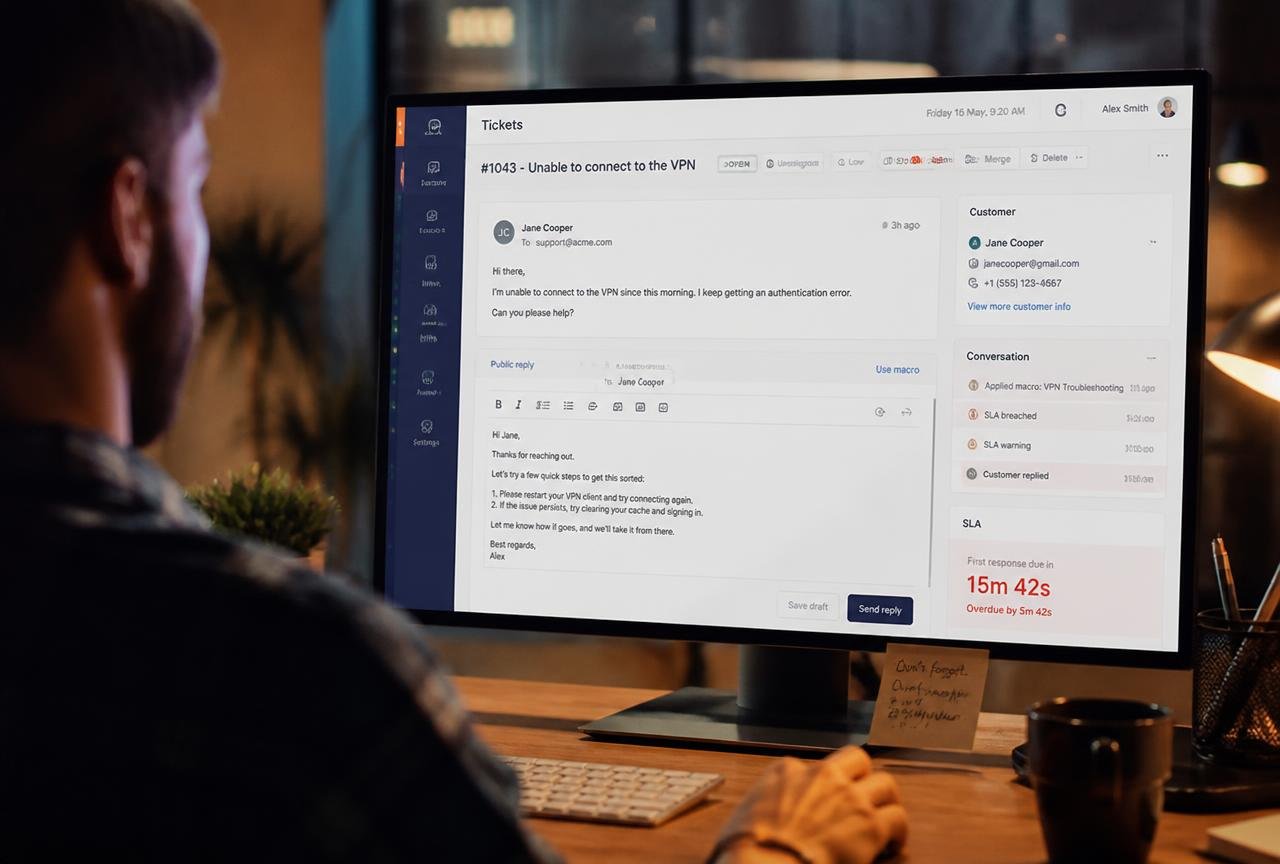
Help desk software is the fix, and for a small business it is a modest one. You are not buying a call centre. You are buying a single place where every customer conversation lands, gets an owner, gets a deadline, and can be measured — across email, live chat, WhatsApp, social messages and phone.
This guide covers what help desk software genuinely does, how Freshdesk, Zoho Desk, HubSpot Service Hub, Help Scout, Zendesk, Intercom and Front compare for teams of one to twenty agents, what they cost once you add the seats and channels you actually need, how to build a knowledge base that deflects tickets instead of gathering dust, and a 21-day rollout your team will not resent.
What help desk software actually does
A help desk turns messages into tickets. That sounds bureaucratic until you notice what a ticket gives you that an email does not: an owner, a status, a priority, a due time, a customer history, and a record that survives someone leaving the company.
The seven jobs the software has to do well
- Unify channels — email, web form, live chat, WhatsApp, Instagram, Facebook and phone arrive in one queue rather than seven apps.
- Assign clearly — every conversation has exactly one owner, automatically, by round robin, skill or business hours.
- Prevent collisions — agents see when a colleague is already typing a reply.
- Enforce response promises — service level agreements (SLAs) with visible timers and escalation when they are about to breach.
- Reuse knowledge — saved replies, macros and a public help centre so the same answer is written once.
- Show context — past tickets, order history and CRM data beside the message, without switching tabs.
- Report honestly — first response time, resolution time, volume by topic, and customer satisfaction (CSAT).
Help desk versus CRM versus shared inbox
These three overlap and are not interchangeable. A shared inbox (Google Groups, a mailbox everyone opens) has no ownership model. A CRM tracks the commercial relationship and pipeline — see our comparison of the best CRM for small business if that is the gap you actually have. A help desk owns the post-sale conversation and the promises attached to it. Growing companies usually need the CRM first and the help desk second, but the second need arrives faster than most expect.
Eight signs you have outgrown the shared inbox
- Two agents have replied to the same customer with different answers.
- A customer has said "I emailed last week and heard nothing."
- You cannot say how many support requests you received last month.
- The same question is answered from scratch every week.
- Handovers require forwarding threads with "FYI" at the top.
- Nobody knows your average first response time.
- Support requests arrive on Instagram and WhatsApp and live only on someone's phone.
- When your best support person is away, quality visibly drops.
Any three of these justify a trial. Entry-tier help desks start free or in the region of $15 per agent per month, which is less than the revenue attached to a single churned customer for most B2B and subscription businesses.
Best help desk software for small business: compared
Prices below are entry paid tiers from each vendor's published pricing, billed annually where that is the standard presentation, and change often. Confirm current figures and regional availability before buying — several vendors price differently in the UK, Canada and Australia.
| Platform | Best for | Entry price | Free tier | Knowledge base | Live chat |
|---|---|---|---|---|---|
| Freshdesk | Best all-round value for growing teams | ~$15/agent/mo | Yes, limited agents | Yes | Add-on / higher tier |
| Zoho Desk | Teams already inside the Zoho suite | ~$14/agent/mo | Yes, 3 agents | Yes | Higher tiers |
| HubSpot Service Hub | Support tied tightly to sales data | ~$15/seat/mo | Yes, limited | Yes | Yes |
| Help Scout | Human, email-first support | ~$50/mo entry plan | No, trial only | Yes (Docs) | Yes (Beacon) |
| Zendesk | Complex routing and scale ambitions | ~$19/agent/mo | No | Yes | Higher tiers |
| Intercom | Product-led SaaS and in-app messaging | ~$29/seat/mo + usage | No | Yes | Best in class |
| Front | Account-based B2B with named contacts | ~$19/seat/mo | No | Limited | Yes |
Freshdesk
Freshdesk is the safest default for a small team that wants proper ticketing without a project. Automations, SLAs, a public knowledge base and reporting are available on inexpensive tiers, and the free plan is genuinely usable for two or three agents. Live chat and advanced automation sit on higher tiers, so price the plan you will be on in a year, not the one you start on.
Strengths
- Strong feature-to-price ratio at the low end.
- Clean agent interface that new hires learn in an afternoon.
- Solid mobile apps for out-of-hours triage.
Limitations
- Channel add-ons stack up; the "all channels" reality costs more than the headline.
- Reporting customisation is limited below the higher tiers.
Zoho Desk
If you already run Zoho CRM, Books or Inventory, Desk is the obvious pick: shared customer records, one bill, one admin console. Standalone it is still competitive, with good SLA management and a competent AI assistant. The interface is denser than Freshdesk's, which some teams prefer and some do not.
HubSpot Service Hub
Service Hub's advantage is context. A support ticket sits beside the deal, the marketing emails and the company record, so an agent can see that the person complaining is three weeks from renewal. That is worth a lot for B2B subscription businesses. Seat pricing and the jump between tiers are the usual caveats — read HubSpot's official pricing page carefully, especially the difference between core and view-only seats.
Help Scout
Help Scout deliberately hides the machinery. Customers receive normal-looking emails with no ticket numbers, and agents work in something that feels like a very good shared inbox with reporting, saved replies and a knowledge base behind it. For services businesses, agencies and premium products where support tone matters, it is frequently the one teams stay with. Pricing is plan-based rather than purely per agent, which suits small teams with occasional helpers.
Zendesk
Zendesk is the enterprise standard scaled down. Its routing, business rules and app marketplace outclass most rivals, and if you genuinely expect twenty-plus agents and multi-brand support, buying it early avoids a migration. For a five-person team it is more machine than the job needs, and administration takes real ownership.
Intercom
Intercom is built around in-product messaging: a messenger that recognises the logged-in user, proactive tours, and AI resolution of common questions before a human sees them. For SaaS products with self-serve signup, that deflection is the whole point. Usage-based components mean cost scales with success, so model it against realistic conversation volumes.
Front
Front sits between shared inbox and help desk, organised around accounts and named relationships rather than anonymous tickets. B2B teams where the same twenty customers email constantly — logistics, wholesale, professional services — often find it the most natural fit, at the cost of a lighter knowledge base.
Choosing channels: what to open and what to leave closed
Every channel you open is a promise you must keep. Open fewer, keep them well.
Always. It is asynchronous, searchable and universal. Route support@ into the help desk and never let it land anywhere else.
Help centre
Almost always. A knowledge base is the only channel whose cost per answer falls as volume rises. Fifteen well-written articles typically cover 60–70% of repeat questions.
Live chat
Only with staffing. Chat with a five-hour response time is worse than no chat. If you cannot cover business hours, use a contact form with a clear "we reply within one business day" promise instead.
WhatsApp and social DMs
Increasingly expected in retail and e-commerce, particularly outside the US. Connect them to the help desk or do not offer them, because a phone in someone's pocket is not a support channel.
Phone
High cost per contact, high trust return. For high-value B2B and anything urgent, a published number with logged calls attached to tickets pays for itself. For low-margin volume products it rarely does.
Building a knowledge base that actually deflects tickets
Most help centres fail for the same reason: they are written from the product's perspective, once, and never revised.
Start from the queue, not the sitemap
Export the last 300 tickets, tag them by topic, and sort by frequency. The top fifteen topics are your first fifteen articles. Nothing else gets written until those exist.
Write each article to one job
- Title it as the customer would search it — "How do I change my billing date?" beats "Billing configuration".
- Answer in the first two sentences; detail follows.
- Number the steps and show what success looks like at the end.
- Link to the one adjacent article people ask about next.
Close the loop
Add every new article to your saved replies so agents send the link rather than retyping. Track which articles are viewed before a ticket is still created — those are the articles that are not working. Google's helpful content guidance applies to help centres too: a public knowledge base written for real questions frequently becomes a meaningful organic traffic source in its own right.
Review quarterly
Ten minutes per article, four times a year. Update screenshots, delete anything describing a feature that no longer exists, and merge duplicates. A stale help centre erodes trust faster than an empty one.
AI in support: what works now
Support was the first place generative AI produced measurable small-business value, but only for specific tasks.
Genuinely useful
- Answer drafting. The agent gets a draft grounded in your knowledge base and past resolutions, then edits it. Handling time falls without tone suffering.
- Knowledge-grounded chatbots. A bot restricted to your published documentation resolves routine questions and hands off cleanly. Restriction is the critical word.
- Summarisation. A forty-message thread condensed to five lines before escalation or handover.
- Tagging and triage. Automatic topic classification produces the volume-by-topic data you need to fix root causes.
Handle with care
- Unrestricted bots. A model that improvises policy will eventually invent a refund you do not offer. Ground it, cap it, and always offer a human route.
- Sentiment scores as a performance metric. Useful as a signal, unfair as a target.
Publish a short note on your help centre saying where AI is used and how to reach a person. Customers are far more tolerant of a bot they were told about.
A 21-day rollout your team will not resent
Days 1–7: measure and prepare
- Count last month's conversations, estimate current first response time, and note your top ten topics. Without a baseline you cannot prove improvement.
- Pick one platform and one trial. Parallel trials of three tools reliably produce no decision.
- Draft your response promise and your escalation rule.
Days 8–14: configure narrowly
- Connect email only. Resist every other channel for now.
- Create five statuses at most, three priorities, and one SLA.
- Write ten saved replies and the first five knowledge base articles.
- Set assignment rules and test what happens out of hours.
Days 15–21: run live and tune
- Move all support email over on a Monday, not a Friday.
- Hold a fifteen-minute standup each morning of week three to catch friction early.
- Add live chat or WhatsApp only once email is calm and staffed.
- Review the first CSAT responses and the tickets that breached SLA; fix the routing that caused them.
If your support load is largely onboarding questions from new customers, tightening that process upstream reduces tickets faster than any tool will. Our guide to client onboarding software pairs directly with this one.
The five metrics worth reporting
| Metric | What it tells you | Reasonable small-business target |
|---|---|---|
| First response time | Whether customers feel heard | Under 4 business hours |
| Full resolution time | Whether the process finishes | Under 2 business days for routine issues |
| CSAT | Quality as the customer perceives it | Above 90% positive |
| Tickets per customer per month | Product and documentation health | Trending down |
| Self-service ratio | Knowledge base effectiveness | Help centre views ≥ 5× ticket volume |
Review these monthly, not daily. Small teams generate noisy weekly numbers, and reacting to noise creates thrash. The most valuable of the five is tickets per customer: it is the only one that measures whether you are fixing causes rather than symptoms.
Turning support data into product decisions
Tag every ticket by topic and bring the top five topics to your monthly planning meeting. Three consecutive months of "cannot find the export button" is not a support problem; it is a design brief. Teams that run this loop consistently see ticket volume flatten while customer numbers grow, which is the only sustainable definition of scalable support.
Frequently asked questions
What is help desk software?
It is a system that collects customer requests from email, chat, phone and social channels into a single queue of tickets, each with an owner, a status, a priority and a response deadline, plus reporting, saved replies and a knowledge base so answers are written once and reused.
How much does help desk software cost for a small business?
Entry paid tiers typically run from about $14–$20 per agent per month (Zoho Desk, Freshdesk, HubSpot Service Hub, Zendesk, Front), with Help Scout starting around $50 per month on a plan basis and Intercom higher with usage-based components. Freshdesk, Zoho Desk and HubSpot all offer limited free tiers.
Do I need a help desk if I already have a CRM?
Usually yes, once more than one person answers customers. A CRM tracks the commercial relationship and pipeline; a help desk owns post-sale conversations, ownership and response-time promises. Some platforms, such as HubSpot and Zoho, provide both on one customer record.
What is a good first response time?
For most small businesses, under four business hours is a credible target and under one hour is excellent. What matters more than the number is consistency and publishing the promise you can actually keep, then configuring an SLA in the software that enforces it.
Should a small team offer live chat?
Only if it can be staffed during the hours it is visible. Unanswered chat is worse for trust than no chat at all. A contact form with a clear one-business-day promise outperforms a chat widget nobody is watching.
How many knowledge base articles do I need to start?
Fifteen, chosen by exporting recent tickets and ranking topics by frequency. That set typically covers the majority of repeat questions. Expand only when the queue shows a new topic recurring, and review every article quarterly.
Is an AI chatbot appropriate for a small business?
Yes, if it is grounded strictly in your own documentation, clearly identified as a bot, and always offers a route to a human. Unrestricted models that improvise policy create refund and warranty problems. Used correctly, grounded bots resolve a meaningful share of routine questions overnight.
How long does it take to migrate from a shared inbox?
Three weeks is realistic: one week to baseline and choose, one to configure email, statuses, SLAs and saved replies, and one to run live and tune. Add channels such as chat or WhatsApp only after email operations are stable.
Can help desk software integrate with my e-commerce store or accounting system?
Most leading platforms integrate natively with Shopify, WooCommerce, Stripe, QuickBooks and Xero, so agents can see orders, subscriptions and invoices beside the conversation. Confirm the specific integration depth during your trial — many listings cover read-only data rather than actions such as issuing a refund.
Task management, collaboration and communication tools for remote teams and SMBs.


